Caching in Joomla
Complete Joomla caching guide for 4, 5, and 6: Conservative vs Progressive, System Page Cache, Redis and Memcached, exclusions, LiteSpeed layering, and staging steps. Upgrades from $149.


Caching in Joomla means storing rendered HTML, component views, and module output so the next guest request skips most database and PHP work. In Joomla 4, 5, and 6 you control three layers: Global Configuration System Cache (Off, Conservative, or Progressive), the System - Page Cache plugin for whole guest pages, and per-module Advanced caching. Handlers decide where copies live (File, APCu, Redis, or Memcached).
Official docs explain the switches. Deep technical posts explain com_cache internals. LiteSpeed magazine pieces cover one host stack. This guide is the operator map: which mode to pick by site type, what breaks Progressive and Page Cache, Redis and Memcached setup gotchas, how to clear and purge safely, and when caching alone cannot fix a slow EOL site. Infyways upgrades and tunes production Joomla from $149 with a free audit within 12 hours.
What you will learn
- The three cache layers and the order they win
- Conservative vs Progressive vs Page Cache with a decision table
- File, APCu, Redis, and Memcached: when each handler is right
- Exclusions for carts, forms, login, and personalised modules
- Clear vs purge, CLI clean, and stale-content fixes
- How LiteSpeed (or another edge cache) should sit beside Joomla cache
- A staging checklist and when to call Infyways
How Joomla caching is layered
Think of three increasing levels of aggressiveness. The first layer that can answer usually wins.
| Layer | Where you set it | What it caches | Who it serves |
|---|---|---|---|
| System Cache (Conservative or Progressive) | System → Global Configuration → System → Cache Settings | Component views and modules (rules differ) | Mostly guests for core content views; access levels are part of the cache id |
| Module Advanced tab | Each module → Advanced | That module only (Use global or No caching) | Respects Conservative; ignored for guests under Progressive |
| System - Page Cache plugin | System → Manage → Plugins | Whole HTML page by URL | Guests only. Fastest built-in option |
Primary sources: Joomla Cache user guide, caching views and modules (manual), and the LiteSpeed Cache and Redis magazine article.
Important: turning System Cache to Conservative does not by itself cache the full page. Full-page guest caching needs the System - Page Cache plugin enabled separately.
Conservative vs Progressive vs Off
| Mode | What happens | Use when | Avoid when |
|---|---|---|---|
| Off | No view or module cache from Global Configuration | Debugging, template work, chasing a stale bug | Busy production brochure sites |
| Conservative (recommended default) | Caches eligible component views and modules that allow caching. Module "No caching" is respected | Almost every site: membership, forms, stores, multilingual | Never the wrong starting point |
| Progressive | For logged-off users, all modules are cached. Module "No caching" has no effect. Module output often shares a com_modules group file | Static brochure sites after careful staging tests | Menus that change by page, random modules, login-aware chrome, anything that must differ per Itemid |
Myth to kill: Progressive is not "caching for logged-in users." Official docs are explicit that core view cachability rules do not flip that way. Progressive is more aggressive module caching for guests.
Classic Progressive failure: the wrong module appears on the wrong page because one cached module blob was reused across Itemids. If you see that, switch back to Conservative immediately.
System - Page Cache plugin
This is the fastest built-in path. On a hit, Joomla can return stored HTML before most of the site boots. It only serves guests. Logged-in visitors always get a fresh build so names, carts, and private menus stay private.
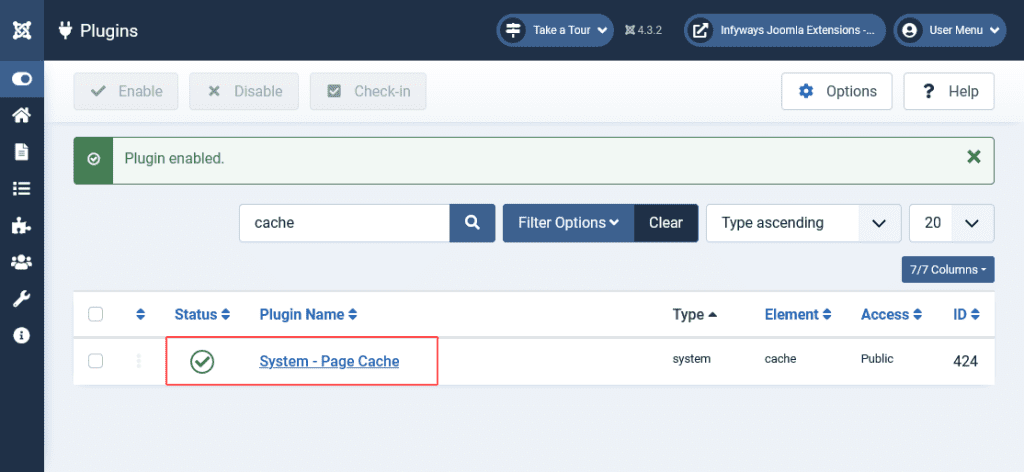
- Enable: System → Manage → Plugins → System - Page Cache
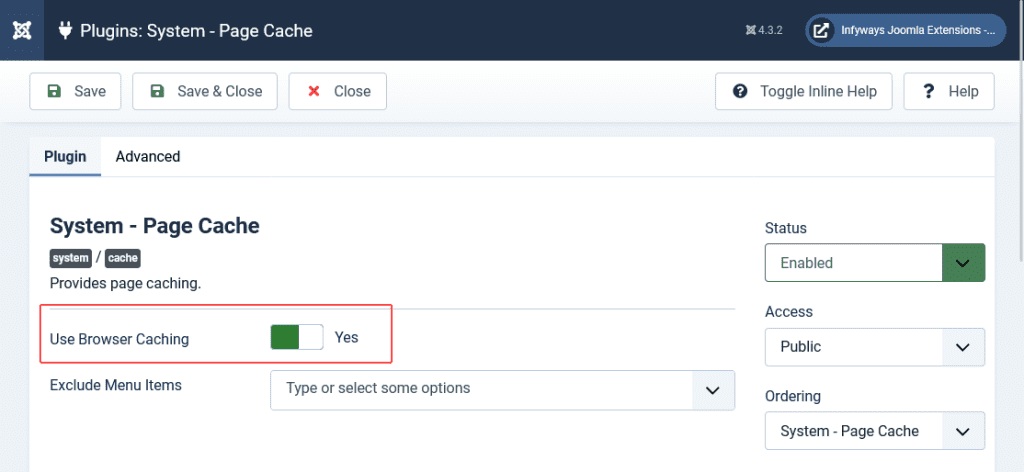
- It uses the same handler and Cache Time as Global Configuration
- Exclude menu items and URL patterns for anything dynamic
- Use Browser Caching sends browser cache headers. Leave it off unless you understand that visitors can keep a page after you clear server cache
Always exclude (or never page-cache): contact and other forms, search results, login and registration, carts and checkout, tokenised or one-time pages, and any URL that must reflect the current session. Editing an article does not always clear every page that embeds it. Clear the page cache group after content launches that must be instant.
Cache handlers: File, APCu, Redis, Memcached
| Handler | Stores in | Best for | Watch outs |
|---|---|---|---|
| File | cache/ and administrator/cache/ | Default on shared hosting and most single servers | Many tiny files on slow disks; purge expired regularly |
| APCu | PHP shared memory | Single server speed win for small items | Not shared across nodes; cleared on PHP restart |
| Redis | Redis server or Unix socket | Clusters, high traffic, LiteSpeed object cache stacks | Wrong host or socket causes 500s; change handler before killing Redis |
| Memcached | Memcached server or socket | Shared cache across web nodes | Often labelled experimental in host UIs; test persistence settings |
Modern Joomla no longer relies on old handlers such as XCache or eAccelerator. If a host guide still lists them, ignore that part.
Redis tip from real support threads: if you disable System Cache while Redis is already unreachable, you can still get connection errors until you switch the handler back to File (or a working Redis), save, then turn caching off. Flush cache after handler changes.
Global Configuration fields that matter
| Setting | Meaning | Practical default |
|---|---|---|
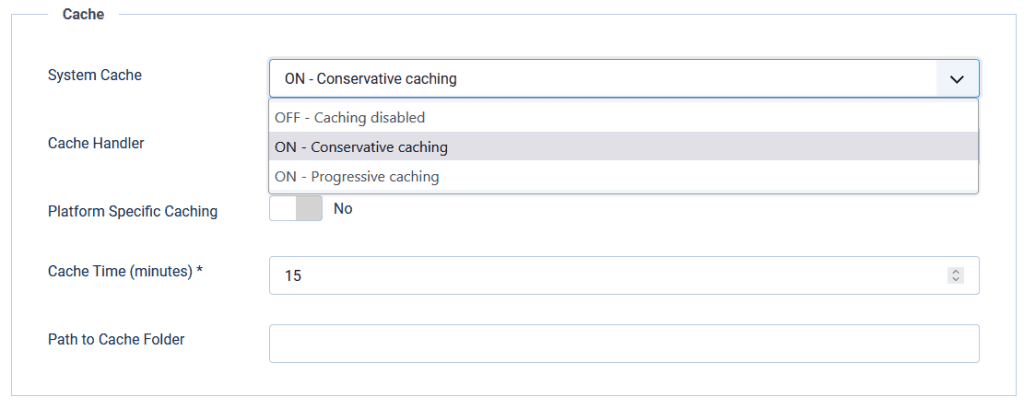
| System Cache | Off / Conservative / Progressive | Conservative |
| Cache Handler | Where items are stored | File, then Redis on capable hosts |
| Platform Specific Caching | Adds device type into the cache id | No, unless desktop and mobile HTML truly differ on the same URL |
| Cache Time | Lifetime in minutes (default 15) | 15 for mixed sites; lower for news; higher for static brochures |
| Path to Cache Folder | Custom file path | Leave blank unless you know why |
Module Cache Time is in seconds. Global Cache Time is in minutes. Mixing those units is a common misconfiguration.
Per-module caching
- Open the module → Advanced → Caching: Use global or No caching
- Set No caching for login status, live counters, random quotes, carts, and anything personal
- Under Progressive for guests, No caching is ignored. That is why Progressive breaks dynamic chrome
- Some modules declare a cache mode in code (static, itemid, and similar). A badly coded static mode can freeze wrong content even on Conservative
Breadcrumbs is a safe module to use when testing Conservative caching on staging.
Decision guide by site type
| Site type | System Cache | Page Cache plugin | Handler | Notes |
|---|---|---|---|---|
| Brochure / marketing | Conservative (try Progressive only after tests) | On, with form pages excluded | File or Redis | Biggest easy win |
| Membership / ACL content | Conservative | On for public pages only; exclude member areas | File or Redis | Access levels belong in cache ids; still exclude personal dashboards |
| Multilingual | Conservative | On | File or Redis | Language is part of identity; clear cache after language or SEF changes |
| VirtueMart / Hikashop / carts | Conservative | On only for static CMS pages; exclude cart, checkout, account | File or Redis | Page Cache on cart URLs causes classic "empty cart" bugs |
| Heavy community / logged-in traffic | Conservative | Limited; focus on guest landing pages | Redis preferred on busy hosts | Page Cache helps guests only |
| LiteSpeed host | Conservative | Often rely on LiteSpeed full-page; keep Joomla Conservative | Redis as object cache when offered | Magazine guidance: Conservative with LiteSpeed + Redis reduces conflicts |
LiteSpeed, CDN, and Redis together
Edge page cache (LiteSpeed Cache for Joomla, Cloudflare, or a reverse proxy) sits in front of Joomla. Redis or Memcached as the Joomla cache handler speeds object and view cache behind that. Do not stack three aggressive full-page systems without a purge story.
- Prefer Conservative when an external full-page cache is already on
- Let the edge plugin purge on article save when it supports automatic purge
- Use Redis for shared or high-traffic object cache, not as a substitute for excluding dynamic URLs
- ESI and logged-in edge features vary by LiteSpeed edition. Test on staging
Clear Cache vs Clear Expired Cache
| Action | Path | Removes | Use when |
|---|---|---|---|
| Clear Cache | System → Maintenance → Clear Cache | Selected groups or everything | After template, override, or extension updates; stale homepage; debugging |
| Clear Expired Cache | System → Maintenance → Clear Expired Cache | Only past-lifetime items | Routine housekeeping so File handler folders do not fill forever |
| CLI clean | php cli/joomla.php cache:clean | All (or expired with the expired argument) | Deploy scripts and cron |
With the File handler you can also empty cache/ via SFTP if the admin is down. That is equivalent to a full clear. Joomla cache is not a database table.
Step 1: Set a safe baseline on staging
- Clone production to staging.
- System → Global Configuration → System → Cache Settings: System Cache = ON - Conservative caching, Handler = File, Platform Specific Caching = No, Cache Time = 15.
- Save. Browse as a guest. Confirm pages load and dynamic modules still update.
- Only then introduce Redis or Progressive on a second staging pass.
Step 2: Enable Page Cache with exclusions
- Enable System - Page Cache.
- Exclude contact, search, login, cart, checkout, and account menu items.
- Leave Use Browser Caching off for the first week.
- As a guest, load a public article twice. Confirm a
cache/pageentry appears when using the File handler. - Edit that article, clear the
pagegroup, and confirm the front end updates.
Step 3: Tune modules and handlers
- Set personal or random modules to No caching (Conservative only).
- If the host offers Redis, set handler to Redis, enter socket or host, port 0 for Unix sockets when required, save, then Clear Cache.
- Retest guest and logged-in paths, forms, and checkout.
- Optional: try Progressive only on a static brochure clone. Revert at the first wrong-module symptom.
Step 4: Production cutover and monitoring
- Apply the proven staging settings during a low-traffic window
- Clear Cache after deploy
- Watch Core Web Vitals and server CPU for a week
- Schedule Clear Expired Cache or CLI purge if you stay on File
- Document exclusions so the next editor does not enable Page Cache on checkout
Troubleshooting stale or broken cache
| Symptom | Likely cause | Fix |
|---|---|---|
| Old article text on guests | Page Cache still holding URL | Clear page group; shorten Cache Time if launches are frequent |
| Wrong module on a page | Progressive guest module cache | Switch to Conservative; clear com_modules |
| Empty cart or stuck form | Page Cache on dynamic URLs | Exclude those menu items and URLs; clear page cache |
| Redis connection 500 after "turning cache off" | Handler still Redis while server is down | Set handler to File while Redis is up, save, then disable caching |
| Logged-in users see no speed gain from Page Cache | By design | Rely on Conservative + Redis; Page Cache is guest-only |
| Mobile gets desktop chrome | Platform Specific Caching off while serving different HTML | Enable only if HTML truly differs; prefer one responsive template |
Related reading: Joomla upgrade issues and fix Joomla update errors when cache problems appear after a version hop.
When caching is not enough
Cache multiplies a healthy stack. It does not replace an unsupported Joomla 3 site, an abandoned template full of blocking scripts, or PHP that the host is about to retire. If Time to First Byte stays poor after Conservative + Page Cache on staging, fix the CMS and template path first.
Infyways runs that path as a service:
- Free compatibility and performance audit within 12 hours
- Fixed packages from $149 small / $299 medium / custom for stores and clusters
- 100+ JED extensions in-house when a cache-hostile extension needs a rebuild
- Staging-first cutover and 30 days of post-launch support on defects we introduce
Start: Joomla Upgrade Services.
What thinner articles leave out
| Topic | Typical post | This guide |
|---|---|---|
| Versions | Joomla 3 or 4 screenshots only | Joomla 4 / 5 / 6 settings that still apply |
| Conservative vs Progressive | One paragraph or a myth about logged-in users | Decision table + Progressive failure mode |
| Page Cache | "Turn the plugin on" | Guest-only rule, exclusions, browser caching warning |
| Handlers | File only, or outdated APC lists | File, APCu, Redis, Memcached with cluster notes |
| Edge cache | Missing or vendor-only | LiteSpeed + Redis layering with Conservative default |
| Operations | Clear Cache button | Clear vs purge, CLI, deploy hygiene |
| Site types | Generic speed claims | Brochure, ACL, multilingual, cart matrix |
| Next step | Affiliate plugin link | Staging steps + Infyways audit from $149 |
Key takeaways
- Start with Conservative caching. Add System - Page Cache for guests with strict exclusions.
- Progressive is optional and dangerous for dynamic modules. It is not "logged-in caching."
- Full-page cache is a separate plugin. Global System Cache alone is not full-page cache.
- File is fine for most sites. Redis or Memcached help clusters and high traffic.
- Global Cache Time is minutes. Module Cache Time is seconds.
- Clear the page group after launches that must be instant. Purge expired on File hosts.
- Edge cache plus Joomla Conservative plus Redis is a common modern stack. Test purge behaviour.
- If the site is EOL or template-bound, upgrade first. Cache cannot patch an unsupported core.
Frequently asked questions
It is storing views, modules, or whole guest pages so repeat requests skip most PHP and database work. You control it with System Cache, module Advanced settings, and the System - Page Cache plugin.
Use Conservative for almost every site. Use Progressive only on static brochure sites after staging tests, because guest modules are force-cached and "No caching" is ignored.
No. Conservative or Progressive cache views and modules. Whole-page guest caching needs the System - Page Cache plugin.
No. The plugin serves guests only so personalised HTML is never shared between users.
No. That is a common myth. Progressive changes how guest modules are cached. Core view rules for logged-in users stay separate.
File for standard shared hosting. APCu for a fast single server. Redis or Memcached when you need shared memory cache across nodes or your host recommends it with LiteSpeed.
Page Cache is almost certainly covering cart or checkout URLs. Exclude those menu items and clear the page cache group.
Run php cli/joomla.php cache:clean from the site root. Use the expired variant for purge-only cleanup in cron.
No. It can help guests, but unsupported core, old PHP, and abandoned templates still need an upgrade path. See benefits of Joomla migration.
Packages start at $149 for small sites and $299 for medium sites. Stores and multi-node setups are custom after the free audit.

Written by
Abhilash Sahoo
Abhilash Sahoo, with over 16 years of experience, is Founder & CEO of Infyways Solutions. He builds web platforms and eCommerce on Joomla, WordPress, Shopify, Magento, and OpenCart, plus modern stacks like Next.js, React, Node.js, and Python, with AI agents, automation, and headless CMS when products need to scale.
Keep reading