Test and enable Gzip compression in Joomla
Enable and test Gzip in Joomla 4, 5, and 6: Gzip Page Compression, static CSS/JS via server or CDN, curl checks, double-compression fixes, and Brotli.
 Abhilash SahooFounder & CEO, Infyways
- Published
- Updated
- Reading time
- 6 min read
On this page 12 sections
- What you will learn
- What Joomla Gzip Page Compression actually compresses
- Step 1: Confirm zlib and current headers
- Step 2: Enable Gzip Page Compression in Joomla
- Step 3: Test properly (HTML vs CSS/JS)
- Step 4: DIY server compression for static assets
- Step 5: Brotli and CDN in 2026
- Step 6: Troubleshoot and disable cleanly
- Gzip is not a substitute for a healthy stack
- What thinner articles leave out
- Key takeaways
- Frequently asked questions
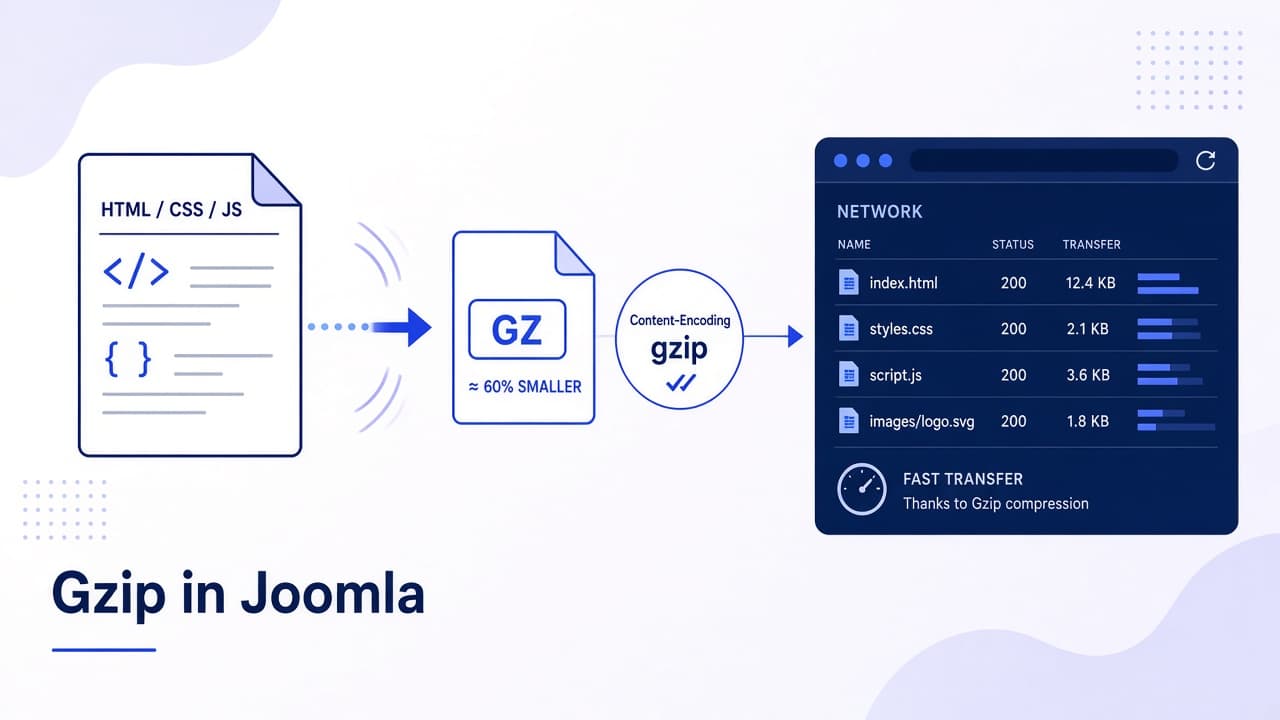
Gzip compression in Joomla shrinks text responses (especially HTML that PHP builds) before they leave the server, so browsers download less data. On Joomla 4, 5, and 6 you enable Gzip Page Compression under System → Global Configuration → Server. That switch compresses Joomla's buffered page output when PHP zlib is available. Static CSS and JavaScript files are a separate job for Apache mod_deflate / the Joomla .htaccess gzip section, Nginx, LiteSpeed, or a CDN (often Brotli with Gzip fallback).
Many "5 simple steps" posts turn the Global Configuration toggle on and stop. Then GTmetrix still complains about uncompressed assets, or the site shows ERR_CONTENT_DECODING_FAILED from double compression. This guide covers what the toggle really does, how to test correctly, DIY server rules, Brotli in 2026, and how to undo a bad stack without guessing.
What you will learn
- Gzip Page Compression vs server or CDN compression for static files
- How to enable and disable the Joomla setting safely
- How to test with DevTools and curl (not only a random online badge)
- DIY
.htaccess/ host panel options and the official htaccess.txt gzip block - Why double Gzip breaks pages and how to fix it
- Where Brotli fits, and when compression is not the real speed problem
What Joomla Gzip Page Compression actually compresses
| Layer | Compresses | Where you enable it |
|---|---|---|
| Gzip Page Compression | Buffered HTML (and related PHP output) when zlib works | Global Configuration → Server |
| Apache / LiteSpeed / Nginx | Often CSS, JS, HTML, JSON, SVG, fonts | Host panel, vhost, or .htaccess |
| Joomla htaccess.txt gzip section | Prebuilt .css.gz / .js.gz if those files exist | Root .htaccess from current htaccess.txt |
| CDN (Cloudflare and similar) | Edge compression, often Brotli + Gzip | CDN dashboard |
Official help describes the setting as compressing buffered output if supported. Requirements: PHP compiled with zlib, and no second compressor already mangling the same response.
Step 1: Confirm zlib and current headers
- System → System Information → PHP Settings. Confirm zlib (or zlib compression support) is available.
- Open the live homepage in a private window.
- DevTools → Network → select the document request → Headers. Look for
Content-Encoding: gziporbr. - Optional curl check from any machine that can reach the site:
curl -sI -H "Accept-Encoding: gzip, deflate, br" "https://www.example.com/"
Note whether compression is already on before you change anything. Many hosts and CDNs already gzip HTML.
Step 2: Enable Gzip Page Compression in Joomla
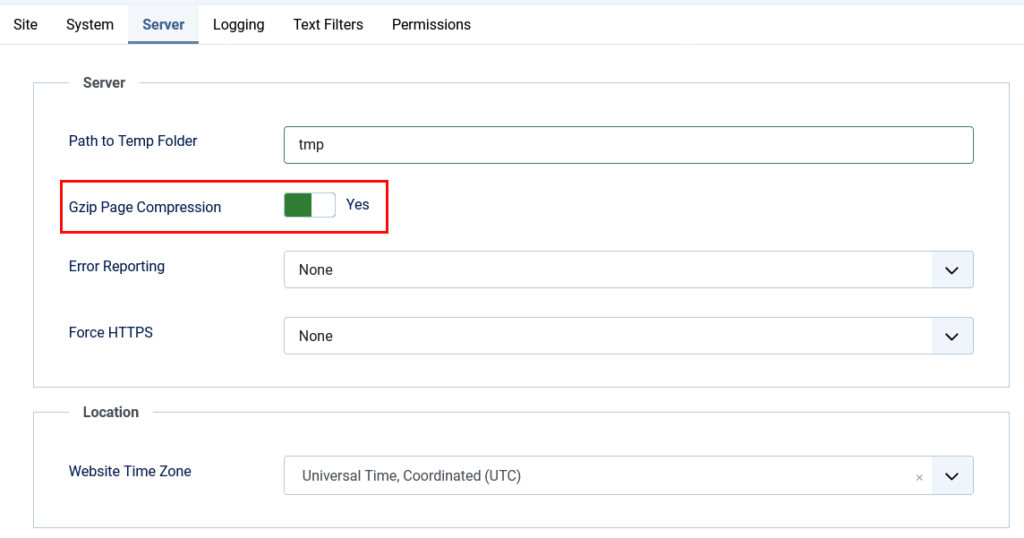
- System → Global Configuration → Server tab.
- Gzip Page Compression: Yes.
- Save & Close.
- System → Clear Cache.
- Retest the document response for
Content-Encoding: gzip.
If the site breaks (blank page, encoding error), set the option back to No immediately, clear cache, and jump to the troubleshooting section. Double compression is the usual culprit.
Step 3: Test properly (HTML vs CSS/JS)
| What you test | How | Pass looks like |
|---|---|---|
| HTML document | DevTools Network → first document, or curl -I with Accept-Encoding | Content-Encoding: gzip or br |
| A CSS file | Click a .css request in Network | Same header, or CDN br |
| A JS file | Click a .js request | Same |
| Online checkers | GTmetrix, KeyCDN HTTP Header Checker, giftofspeed, etc. | Use as a second opinion, not the only proof |
curl -sI -H "Accept-Encoding: gzip" "https://www.example.com/media/system/js/core.min.js"
Joomla's toggle can pass HTML while CSS/JS stay uncompressed. That is expected until the server or CDN compresses static files.
Step 4: DIY server compression for static assets
Prefer the host's "Optimize website" / "Compress content" panel when it exists. On Apache, a minimal deflate block (only if the host does not already compress) looks like:
<IfModule mod_deflate.c>
  AddOutputFilterByType DEFLATE text/html text/plain text/xml text/css
  AddOutputFilterByType DEFLATE application/javascript application/json application/xml
</IfModule>
Rules of thumb:
- Do not stack aggressive
mod_deflateon top of Joomla Gzip Page Compression if HTML starts failing. Pick one HTML compressor. - Keep a backup of
.htaccessbefore editing. - After Joomla updates, diff your
.htaccessagainst the shippinghtaccess.txt. The GZIP & BROTLI section evolved (includingE=no-brotli:1on precompressed assets).
Official notes: The htaccess.txt file. If the site looks strange after enabling that gzip section, the comments in htaccess.txt say your server may already gzip CSS/JS. Comment the block out.
Step 5: Brotli and CDN in 2026
Modern browsers prefer Brotli (Content-Encoding: br) when the edge supports it. Joomla has no "Brotli Page Compression" switch. Enable Brotli on LiteSpeed, Cloudflare, or Nginx with the brotli module, and keep Gzip as fallback for older clients.
- If the CDN already compresses, you often leave Joomla Gzip on or off based on whether origin HTML is still uncompressed in a bypass test
- Test with a cache-bypassing header or orange-cloud off briefly so you know whether origin or edge is doing the work
- Precompressed
.js.gz/.css.gzmust not be compressed again (the stock htaccess rules set no-gzip / no-brotli for those files)
Step 6: Troubleshoot and disable cleanly
| Symptom | Likely cause | Fix |
|---|---|---|
ERR_CONTENT_DECODING_FAILED | Double Gzip / Brotli | Turn Joomla Gzip off, or remove duplicate server rules, clear caches |
| HTML compressed, CSS/JS not | Only page compression on | Enable server/CDN compression for static types |
| Nothing compressed | No zlib, proxy stripping encoding, or Accept-Encoding missing in the test | Check PHP info, retest with the curl header above |
| Works in curl, fails in browser | Extension, SW, or CDN cache serving a bad body | Purge CDN, disable service worker, retest private window |
| CPU spikes after enabling | Compressing huge uncacheable HTML every hit | Add page/object cache. See caching in Joomla |
To disable Joomla's layer only: Global Configuration → Server → Gzip Page Compression → No → Save → Clear Cache. That does not turn off host or CDN compression.
Gzip is not a substitute for a healthy stack
Compression helps text weight. It does not replace image optimisation, a current PHP version, or leaving Joomla 3. If Core Web Vitals stay poor after Gzip and cache, fix the platform. Infyways upgrades start at $149 with a free audit within 12 hours: Joomla Upgrade Services.
What thinner articles leave out
| Topic | Typical post | This guide |
|---|---|---|
| Scope of the toggle | "Compresses all files" | HTML buffer vs static assets vs CDN |
| Testing | One online badge | DevTools + curl for HTML and JS/CSS |
| Double compression | Rarely mentioned | ERR_CONTENT_DECODING_FAILED playbook |
| htaccess.txt | Random deflate snippet | Official gzip/brotli notes and when to disable |
| Brotli | Missing or hand-wavy | CDN/server layer, not a Joomla switch |
| Next bottleneck | Stop at Gzip | Cache and upgrade path |
Key takeaways
- Turn on Gzip Page Compression for buffered HTML when zlib is present.
- Compress CSS/JS at the server or CDN. The Joomla toggle alone is not enough.
- Test the document and at least one CSS and one JS request.
- Avoid double compression. Decoding errors mean turn a layer off.
- Keep
.htaccessaligned with current htaccess.txt after upgrades. - Prefer Brotli at the edge when available, with Gzip fallback.
- Pair compression with caching. Compression on an uncached PHP hit still costs CPU.
Frequently asked questions
Filed under Joomla